What Is a Cloud Management Platform (CMP)? Benefits & How to Choose
Quick answer: A cloud management platform (CMP) helps organizations manage cloud resources and services through centralized tools and workflows. Depending on the product and its integrations, it can support provisioning, monitoring, automation, governance and cost visibility across multiple environments.
Using more than one cloud environment can provide flexibility, but it can also spread resource information, access controls, workflows and spending data across different consoles. A CMP can bring selected management tasks into a more consistent operating model. The right fit depends on the cloud services an organization uses, the work it needs to automate and the controls its teams require.
What Is a Cloud Management Platform (CMP)?
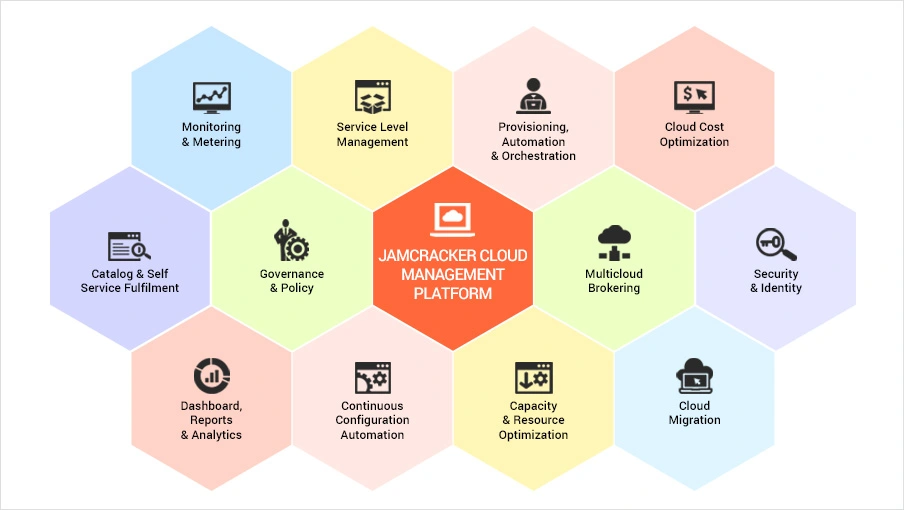
A cloud management platform is software used to manage cloud resources, services and operational workflows. Depending on its scope, it may provide a common interface for requesting services, provisioning resources, applying policies, monitoring usage and reviewing costs.
CMP products vary. Some focus on infrastructure operations; others include service catalogs, orchestration, governance, financial management or service-provider capabilities. Check which functions are built in and which depend on separate tools, cloud-provider features or integrations.
Cloud management can span public, private and hybrid environments. Organizations operating across these environments may also need hybrid cloud management capabilities to coordinate resources and operations across different infrastructure environments. Support for a particular provider, resource type or workflow should be verified against the product's current documentation. For background terminology, see Gartner's glossary entry for cloud management platforms.
Why Do Organizations Use a CMP?
Organizations consider a CMP when managing cloud services across separate consoles and processes becomes difficult to coordinate. Benefits depend on the platform's features, configuration, integrations and how teams use it.
- More consistent operations: Standardized request and provisioning workflows can reduce repeated manual steps across environments.
- Better resource visibility: A consolidated view can help teams review resource status and usage data available to the platform.
- Cost awareness: Usage and spending views can help teams investigate unexpected costs or underused resources. Organizations that need more detailed visibility into cloud consumption can also explore cloud cost analytics. Allocation and optimization depend on the quality and coverage of the underlying data.
- Governance controls: Approved templates, access permissions and policy workflows can help teams apply consistent rules. Available controls differ by product and provider.
- Self-service with guardrails: A service catalog and approval workflow can let users request approved services while following organizational controls.
Key Capabilities of a Cloud Management Platform
Not every CMP includes all the capabilities below. Use this list to define requirements, then verify the details for each product you evaluate.
1. Self-service portal and service catalog
A portal can give authorized users a place to request approved cloud services. A service catalog describes available services, configurations, approval steps and usage rules. For service providers that want to offer cloud and digital services through a branded self-service environment, a digital marketplace platform can also support service discovery, ordering and delivery.
2. Resource management and provisioning
Provisioning capabilities help teams create, configure and manage supported cloud resources. Check which resource types and providers are covered and whether workflows include your required approval and lifecycle steps.
3. Automation and orchestration
Automation handles repeatable tasks; orchestration coordinates multiple tasks into a workflow. Ask how workflows are configured and how failures, approvals and audit records are handled.
4. Monitoring and reporting
Dashboards and reports can combine supported information about resource status, usage and operational activity. Confirm data sources, refresh frequency, export options and reporting limits instead of assuming every metric is available in real time.
5. Financial management and cost visibility
Financial features may include spend reporting, budgets, cost allocation, usage analysis or billing workflows. Confirm whether the platform supports your required billing model, allocation rules and data sources. Where cloud services need to be monetized or invoiced, organizations may also need dedicated cloud billing and financial management capabilities. Cost analytics and billing serve related but different purposes, so evaluate both requirements separately.
6. Security, access and governance
Depending on the product, controls may include role-based access, approval workflows, policy checks and audit trails. Validate how permissions connect with your identity provider and underlying cloud platforms.
7. Integrations and migration support
Integrations may connect a CMP with IT service management, identity, monitoring, billing or other operational systems. Migration planning may be a separate capability or service, so confirm whether it is included in the product being considered.
CMP vs. Native Cloud Consoles vs. Cloud Cost Management Tools
These categories can overlap, so compare actual capabilities rather than relying on product labels alone.
| Tool type | Typical purpose | What to verify |
|---|---|---|
| Native cloud console | Manage resources and services within a particular cloud provider. | Whether it covers your other providers and cross-environment workflows. |
| Cloud management platform | Coordinate selected cloud operations, workflows and controls across supported environments. | Provider coverage, automation, governance, integrations and operational scope. |
| Cloud cost management tool | Analyze cloud spend, usage, allocation and optimization opportunities. | Supported cost data, allocation methods, recommendations and budget features. |
A CMP may include cost management, and a cost management product may offer governance or automation. Determine which capabilities you need and whether one product can meet them without additional tools.
How to Choose the Right CMP
Start by documenting the tasks you need to improve, the environments you operate and the controls you must maintain. Use this checklist when comparing vendors.
- Cloud and service compatibility: List current and planned providers, services and resource types. Ask vendors to demonstrate your use cases rather than relying on general compatibility claims.
- Required workflows: Identify tasks to automate, such as service requests, approvals, provisioning, policy checks or reporting. Confirm how workflows are configured and maintained.
- Security and governance: Review role-based access, identity integration, approval controls, audit trails and policy options. Map each requirement to a documented capability.
- Integration effort: Check compatibility with IT service management, identity, monitoring, finance and billing systems. Ask whether each integration is native, API-based, partner-provided or requires custom work.
- Cost visibility and pricing: Confirm available usage and cost data, allocation methods, and whether licensing, implementation, integration and support fees are additional.
- Scale and usability: Test the expected number of users, tenants, accounts, services and workflows. Check whether administration remains practical as the environment grows.
- Evidence and support: Request a demonstration using a representative scenario, documentation for key features, and clear information about onboarding and support.
Questions to ask during a CMP evaluation
- Which of our cloud providers and services are supported today?
- Which capabilities require extra licenses, integrations or professional services?
- Can we test our own provisioning, approval and reporting workflows before committing?
- How are access, policy changes and operational activity recorded?
- What data is available for cost allocation, and how often is it refreshed?
- What are the full implementation and ongoing operating costs?
When Does an Organization Need a CMP?
A CMP may be worth evaluating when teams manage multiple cloud accounts or providers, repeat provisioning tasks manually, need a more consistent service-request process, or struggle to apply governance across environments. A small team with straightforward needs may be adequately served by native tools. The decision should follow operational requirements, not simply the number of clouds in use.
Explore a Cloud Management Platform
If you are moving from research to vendor evaluation, review Jamcracker's Cloud Management Platform to understand its stated capabilities and assess whether they match your requirements. Validate specific provider support, integrations and workflows against your use cases before making a decision.
Frequently Asked Questions
What is a cloud management platform used for?
A CMP helps coordinate supported cloud-management tasks, which may include service requests, provisioning, automation, governance, monitoring and cost visibility.
Is a CMP the same as a cloud cost management tool?
No. A cloud cost management tool focuses primarily on spend and usage analysis, allocation and optimization. A CMP may include some of those functions alongside operational workflows, provisioning or governance. Scope varies by product.
Can a CMP manage public, private and hybrid cloud environments?
Some CMPs support multiple environment types, but coverage varies. Verify the providers, services, deployment models and workflows supported by the platform under consideration.
Does every organization need a CMP?
No. Organizations with straightforward needs may be able to use native cloud-provider tools. A CMP is worth evaluating when centralized workflows, cross-environment visibility or consistent governance would address a defined operational need.
How should an organization compare CMP vendors?
Compare provider coverage, required workflows, security controls, integrations, reporting, implementation effort, support and total cost. Ask vendors to demonstrate your priority scenarios and document dependencies or limitations.